DESKTOP APP
Your cap table in a dedicated
Windows app
Vquity runs as a native Windows application (x64 and ARM64, frameless, with vquity:// deep links) on exactly the same data as the web app. Windows today; macOS and Linux planned.
A real application
A native app with its own window, built for both Windows architectures.
Vquity ships as a native Windows application, not a wrapped browser tab. It installs like real software, gets its own taskbar identity and alt-tab entry, and opens in a frameless, modern window that remembers its size and position between sessions. Builds ship for x64 and natively for ARM64, so Snapdragon-powered Windows laptops run it without emulation.
- Its own window and taskbar identity: no tab to bury, refresh, or Ctrl+W away
- Window-state persistence: close it Tuesday, reopen Wednesday exactly where you left it
- Native x64 and ARM64 builds; the installer picks the right one
Part of the Lisan Hub
Download it through the Lisan Hub.
Windows builds are distributed through the Lisan Hub, the catalog for Lisan desktop apps, at get.lisan.org/vquity. The download page lists the builds currently available for supported Windows architectures.
- One place to find the current published Windows builds
- x64 and ARM64 packages for supported Windows machines
- Use the full web app whenever installation is not practical
One product, two front doors
Same cap table. Same records. Zero sync steps.
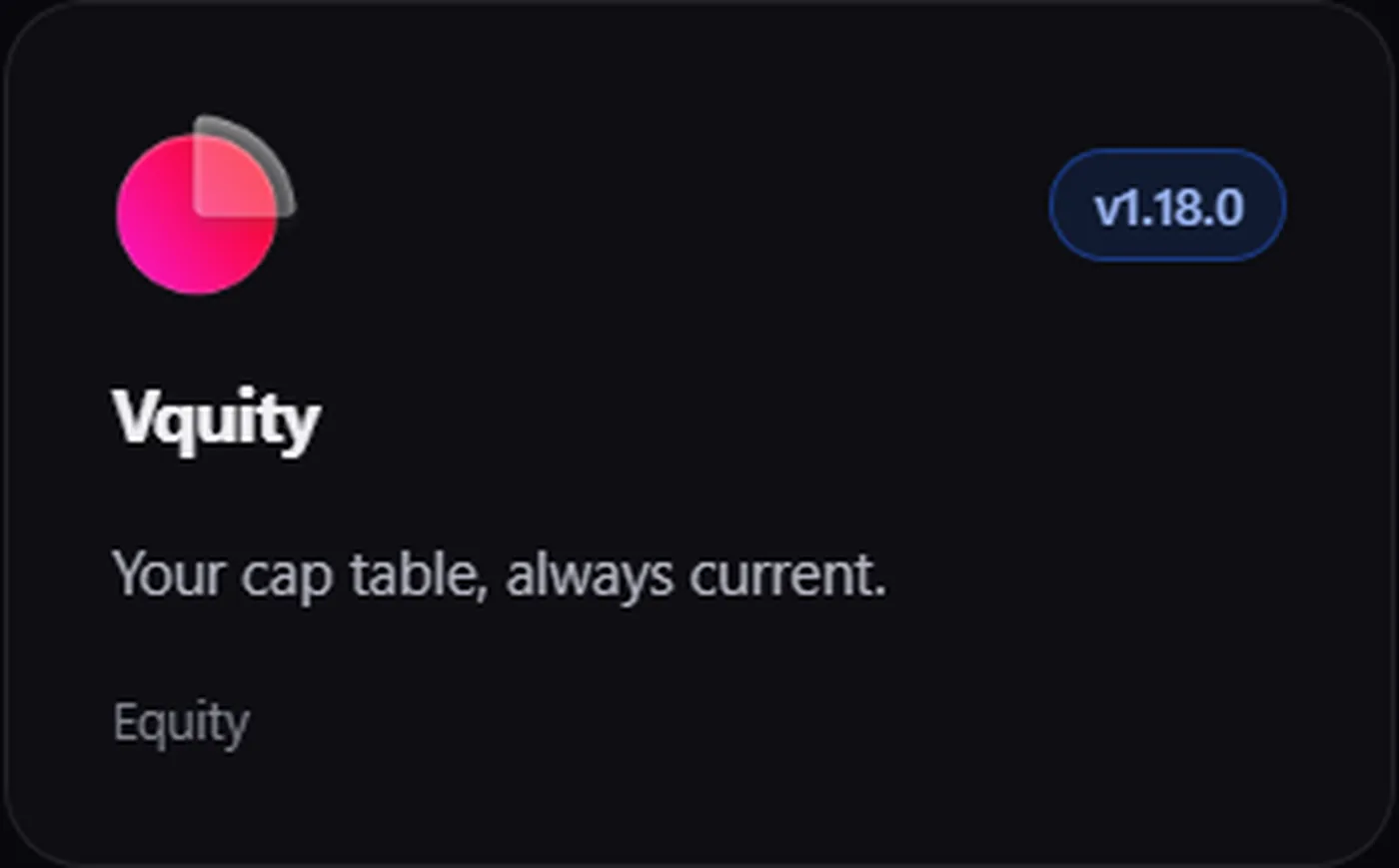
The desktop app is not a companion or a viewer. It is the full product, opening the same workspace.
Same data as the web app
There is no desktop copy of your cap table. Close a round at your desk and it's closed on the web, in the portals, everywhere. One data set, no export-import cycle, no "which version is current?"
vquity:// deep links
Links using the vquity:// protocol open the installed app directly. Put one in a board pack or an internal runbook and clicking it lands the reader in the app. No browser detour, no hunting for the right view.
Every module included
The cap table, rounds, options, waterfall, Data Room, Contract Studio: the desktop app runs all of it. It ships in the all-inclusive plan like everything else; there is no desktop surcharge.
Why a cap table deserves a real application
If you touch the cap table once a quarter, a browser tab is fine. But finance and ops people who actually live in it, reconciling grants, prepping board packs, walking diligence requests, work differently. They keep the tool open all day, alt-tab into it dozens of times, and lose real minutes every time the tab gets buried, refreshed, or closed by a hasty Ctrl+W. A desktop cap table app fixes the small frictions that compound: its own window, its own place in the taskbar, a state that survives a browser update, and an icon your muscle memory can find.
That's the entire argument. Not a different feature set, just the same product in a dedicated window. The desktop app keeps a persistent place in the taskbar, remembers its window state, and can open supported vquity:// links directly.
What's true today, and what isn't yet
Plainly: the desktop app is Windows-only today, in native x64 and ARM64 builds. macOS and Linux versions are planned but not shipped. If you're on a Mac, use the web app. It is the same full product on the same data, and it runs in any modern browser on any OS. Nothing about your workspace changes when you move between the two, because there is nothing to move; both front doors open onto the same records.
Mixed teams work fine, too. A finance lead on a Windows machine can run the desktop app while a founder on a MacBook uses the browser and directors read their portals on whatever they carry. Everyone is looking at one ledger, not three exports of it.
Decide by workflow, not novelty
The desktop app is useful when Vquity is a daily finance or operations tool and a persistent Windows workspace matters. If browser access already fits the team, the full web app remains available on the same records. The comparison pages explain broader product and pricing-model trade-offs without making the desktop window the whole decision.
Where the desktop app fits your workflow
The desktop app earns its place around recurring, keyboard-heavy work. Before a board meeting, capture a point-in-time snapshot and diff it against last quarter's without ever opening a browser. Drop a vquity:// link into the board pack so directors' questions land in the live view instead of a stale screenshot. Modeling the next raise? Run the numbers in the dilution calculator first, then open the app to check the model against the real ledger. And if someone on the team is new to reading ownership tables at all, the Academy's reading a cap table lesson is a fifteen-minute on-ramp.
The fastest way to judge it is to install it: get the Windows build from the download page, sign in, and load the seeded sample company. Or start in the web app today and add the desktop app whenever your team wants a real window.
Frequently asked questions
Which platforms does the Vquity desktop app run on?
Windows, in native x64 and ARM64 builds. ARM64 means Snapdragon-powered Windows laptops run it without emulation. macOS and Linux versions are planned but not shipped yet. Until then, the full web app runs in any modern browser on any OS, against the same data.
Is the desktop app's data separate from the web app?
No. Both are front doors to the same workspace and the same records. A round closed in the desktop app is instantly the state of the cap table on the web and in every stakeholder portal. There is no sync step, no export, and no desktop copy that can drift.
Where do I get the current Windows build?
Use the Vquity download page or the Lisan Hub listing. Both point to the currently published Windows packages for supported architectures.
What are vquity:// deep links?
Links that use the vquity:// protocol to open the installed desktop app directly. Put one in a board pack, a runbook, or a chat message and clicking it opens the app rather than a browser tab. Useful anywhere you'd otherwise write "open Vquity and navigate to…".
Does the desktop app cost extra?
No. Vquity has one all-inclusive plan covering every module on both web and desktop, with no per-stakeholder pricing. The desktop app is a download, not an upsell. It's free to start; install it from the download page or via the Lisan Hub at get.lisan.org/vquity.
Move your cap table off the spreadsheet.
Shareholders to SAFEs, option grants to exit modeling. One platform, priced by the company and not the head, on web and desktop.
All modules included · No per-stakeholder pricing · Explore a seeded sample company in one click